Part 1 of 5 · The 2026 Apple AI Stack
Apple's 2026 AI Stack: Which Layer, When
The iOS AI landscape changed completely this year. Here's the architectural guide I wish I'd had for deciding between Foundation Models, Core AI, and Core ML — a map of which layer to reach for, and when.

Charith 'Alex' Gunasekara
Head of Development & Engineering
The hard part of building AI into an Apple app is no longer what's possible. After WWDC 2026, it's architecture — picking the right tool for each job.
A year ago, "AI on iOS" meant one real choice: call a cloud API, or force a model onto the device yourself. That choice is gone. Apple now hands you a full stack — a system model that can reason, a successor to Core ML built for generative AI, the classic ML engine, and a layer that connects any of it to Siri and Spotlight. The power is right there. The skill that now separates a shipped feature from a stuck one is knowing which layer to reach for, and — just as important — which one to skip.
That's an architecture problem, not a coding problem. And it's the one I keep watching teams get wrong: they pick the layer that's newest, or the one that looks best in a demo, instead of the one the problem actually needs. So this piece is the map I wish I'd had — not a tutorial, but a simple way to decide. The rest of the series goes deep on each layer; this one is about the lines between them.
The teams that win the next two years won't be the ones who can call a model. They'll be the ones who know which model belongs where.
Four names, one question
Strip away the marketing and the 2026 stack is four developer-facing pieces, plus a workbench off to the side:
- App Intents — the front door. How your app's actions and data become things the system can see, search, and act on.
- Foundation Models — the OS reasoning brain. Apple's on-device language model, with Private Cloud Compute behind it for the heavy lifting.
- Core ML — the proven workhorse. The classic ML engine that's been quietly powering apps for years.
- Core AI — the new frontier. Apple's successor to Core ML for generative models, and your way to run your own LLM on-device.
- MLX — the workbench. Where you build, fine-tune, and improve models before they ever ship. (More of a side tool than something your app runs — I'll come back to it.)
Every one of these has a "Meet" session and a docs page that tells you it's wonderful. None of them tells you the only thing that matters when you design: the one question that picks the layer.
That question is: do you use the intelligence Apple ships, or do you bring your own?
The spine: use the OS, or bring your own
Hold that question in your head and the whole stack lines up along one simple line.
On the left: use what the OS gives you. Foundation Models is a strong model that's already on the device, already private, and free to call. You ship no model files, you don't maintain a model, and you get every improvement Apple makes for free. For most "summarize this," "pull out that," "answer in this shape" features, this is the right answer — and the cheapest one.
On the right: bring your own model. Sometimes the system model just can't do the job — you need a specific fine-tuned model, a model trained for your field, or an open model you've tested and trust. That's what Core AI is for: convert your model, shrink it to fit (this is called quantizing), and run it fully on-device on Apple silicon. More power, and more responsibility — you now own the model.
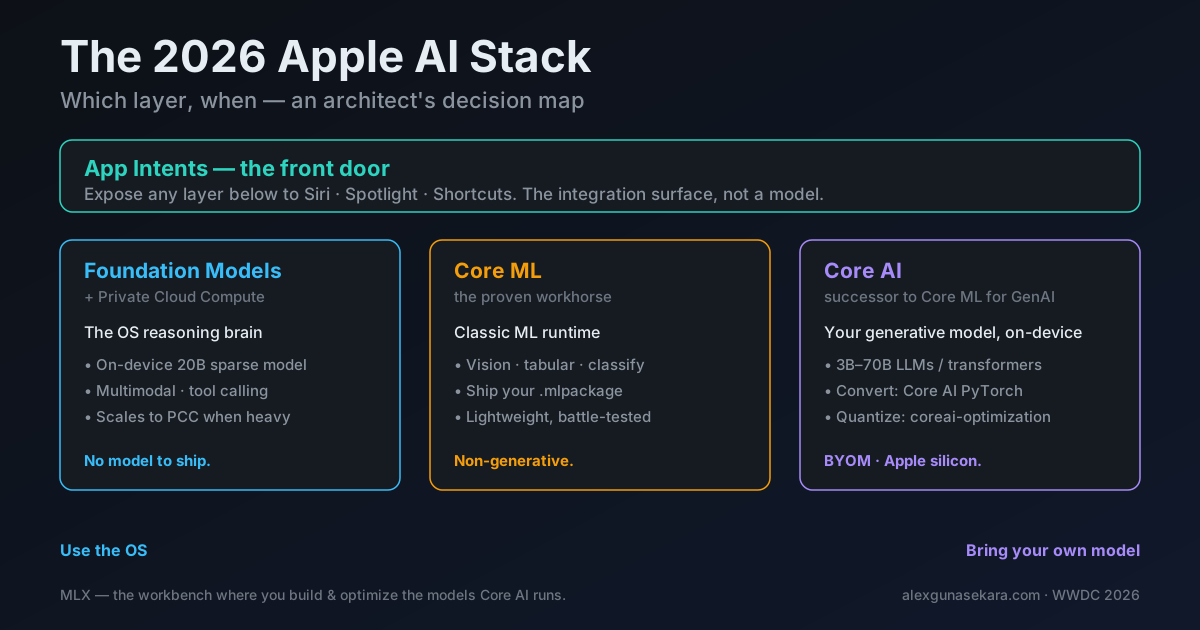
Everything else hangs off that one line. Core ML sits to the side for classic ML — the image, table, and sorting work that was never generative in the first place. And App Intents sits above all of it, as the layer that opens whatever you build to the system. Apple was unusually clear about the split this year: Core ML for classic ML; Core AI for neural networks and transformers; MLX for custom model weights. Remember that one sentence and you understand most of the stack.
App Intents — the front door
App Intents is the layer people skip in the architecture talk, and it's the one that makes the rest invisible — in the good sense. It's how a feature stops being something the user has to open your app to reach, and becomes something Siri, Spotlight, and Shortcuts can run on their own.
In 2026 it got much more powerful. App Schemas let you list your app's data and actions under categories Apple defines (task management, photo editing, communication, and more). These feed Spotlight's search index with real personal context and clear credit back to your app. There's a View Annotations API that links on-screen views to your data, so the system can respond, in a natural way, to what the user is actually looking at — and an App Intents testing framework that tests the real Siri, Shortcuts, and Spotlight paths instead of fragile UI automation.
The key point: App Intents doesn't reason and doesn't generate. It's the wiring. You reach for it whenever you want a feature to work outside your app's own screen — and you pair it with one of the layers below to do the actual thinking.
Foundation Models — the default brain
This is where most features should start, and where I push teams to start by default. The Foundation Models framework gives you a clean Swift API to the on-device system model — rebuilt this year as a 20-billion-parameter sparse model that uses only a few billion parameters per prompt, so it runs on real devices without draining them. It takes images as well as text now, it can call tools on-device (including built-in OCR and barcode readers), and it supports local RAG — answering from the user's own content — using the Spotlight index.
When the on-device model isn't enough, it moves up automatically to Private Cloud Compute — Apple's private server tier — and this year that tier became free for developers under two million first-time downloads. There's also an fm command-line tool, a Python SDK, and an Evaluations framework for testing AI behavior beyond unit tests.
The reason this is the default: you ship nothing. No model files, no conversion step, no model versions to track, no per-use cloud bill. You write prompts and schemas, and the model is already on every supported device, already private, already maintained by Apple.
Reach for Foundation Models first. Make the OS prove it can't do the job before you take on the cost of bringing your own.
Core ML — the proven workhorse
It would be easy to read "Core AI is the successor to Core ML" and assume Core ML is on the way out. It isn't — and betting that way is an expensive mistake. The simplest way to see why is to stop thinking about frameworks for a second and think about verbs — the action word for what you want.
The whole stack splits along one line — what you're actually asking the AI to do:
- Recognize · classify · score · predict — judging something that already exists. "Is this photo a dog?" (98% yes.) "Which category is this transaction — food or travel?" "Will this user churn?" That's Core ML.
- Generate · reason · converse — creating something new. "Turn these rough notes into a polished email." "Answer this in the user's own words." That's the generative side — Foundation Models or Core AI.
Core ML owns the first half, and it owns it clearly. Image classification, object detection, pose, sound, tabular prediction, recommendation, on-device personalization — none of it was ever generative. You convert a model to an .mlpackage, and Core ML runs it across CPU, GPU, and the Neural Engine: a few megabytes on disk, milliseconds to run, almost no battery. That last part is the whole point, and it's where I watch good engineers go wrong.
A 5MB Core ML classifier beats a multi-gigabyte LLM at "is this a dog?" every single time — faster, cheaper, and on a fraction of the battery.
Picture a developer who just wants to tag a bank transaction as Food or Travel. The tempting 2026 move is to hand the transaction to a giant model through Core AI and ask it the category. It works in the demo — and it's the wrong call. You've spent gigabytes of memory and a visible chunk of battery on a job a tiny classifier does instantly and offline. Generative does not mean better; using an LLM to classify is like renting a crane to hang a picture frame.
So the rule is simple, and it's the one to carry into every feature: if you're creating something new, use the generative side; if you're identifying something that already exists, stay on Core ML. Match the layer to the verb — not to whatever's newest.
Core AI — bring your own model
Core AI is the big one for anyone who's ever wanted to run their own model on an iPhone. It's Apple's successor to Core ML, built for generative, neural work, and it runs only on Apple silicon. It covers everything from small 3B vision models to large 70B reasoning models, across iPhone, iPad, Mac, and Vision Pro. It prepares the model ahead of time, so it loads almost instantly, and it gives you a memory-safe Swift API that avoids extra copies of your data.
The "bring your own model" steps are the part to understand when you design. You take a PyTorch model, export it, and convert it — TorchConverter().add_exported_program(ep).to_coreai() — then shrink it for the device with the coreai-optimization library (using quantization and palettization — two ways to make a model smaller). The payoff: a model you chose, running fully on-device, with zero cloud cost per use and nothing leaving the phone. The price: you now own that model's quality, size, and upkeep. That's a real responsibility, and it's exactly why Core AI should be a careful choice, not a default.
MLX — the workbench, not a runtime
A quick word on MLX so it doesn't confuse the decision. MLX is Apple's open-source framework for building and running ML models on Apple silicon — this year it added Metal 4 support and the ability to train across several Macs over Thunderbolt. It's where you experiment with, fine-tune, and optimize a model. It's not what your shipping app calls at runtime — think of it as the workshop where you build the models that Core AI later runs. It matters for how you get there, not for which runtime you ship.
The decision matrix
Here's the whole thing as one table — the version I'd actually pin above an architecture review:
| Layer | What it's for | Where it runs | You bring | Reach for it when… | Walk past it when… |
|---|---|---|---|---|---|
| App Intents | Exposing actions & data to the system | System (Siri, Spotlight, Shortcuts) | Your actions & entities | A capability should live outside your app's UI | The work is purely in-app with no system surface |
| Foundation Models (+ PCC) | General reasoning, summarize, extract, generate | On-device → Private Cloud Compute | Prompts, tools, output schemas | You need language reasoning with zero model ops | You need a specific custom/fine-tuned model |
| Core ML | Classic, non-generative ML | On-device (Neural Engine / GPU / CPU) | Your .mlpackage | The task is classify / detect / score / predict | The task is generative or conversational |
| Core AI | Running your own generative model | On-device, Apple silicon only | Your own model weights | The system model can't do it and you must own the model | Foundation Models already does the job |
Read it top-to-bottom and a default path falls out: wire it up with App Intents, reason with Foundation Models, drop to Core ML for classic ML, and reach for Core AI only when you genuinely have to bring your own.
Two kinds of "bring your own"
One thing trips up even experienced teams, because 2026 quietly gives you two different "bring your own model" stories, and they live on different layers.
The first is cloud BYOM. The Foundation Models framework now lets any provider follow a Language Model protocol — so you can send the same Swift code to another model — Claude, Gemini, even OpenAI's GPT — instead of Apple's own, without rewriting your feature. You bring your own model, but it's someone else's server doing the work.
The second is on-device BYOM — Core AI. You bring your own weights and run them locally, with no server in the loop at all.
These answer completely different questions. Cloud BYOM is for "I want a specific top model's quality, and I'm fine with a network trip and a bill." On-device BYOM is for "this must run on the device — for privacy, speed, or cost — and I'll take on the upkeep to get that." Same three words, opposite designs. Knowing which one a stakeholder actually means is half the battle.
A real example
Make it concrete. Say the request is: "Let users ask natural-language questions about their own documents, privately."
Walk down the line. Does the OS model do the job? Mostly yes — on-device Foundation Models with Spotlight-powered RAG handles private, on-device questions over the user's content without shipping a thing. Connect the entry points through App Intents so it's reachable from Siri and Spotlight, and you're done. No Core AI, no custom model, no cloud bill.
Now change one word — "...with medical-grade accuracy on cancer research papers." Suddenly the system model isn't enough; you need a specific model trained for that field, one you've checked. Now it's a Core AI decision: convert and shrink that model, run it on-device, and accept that you own its accuracy. Same feature shape, different layer — and the word that moved it was a requirement, not a technology.
That's the whole skill. Let the requirement pick the layer. Never let the layer pick the requirement.
The trap
The mistake I'd warn about most: reaching right when the answer was on the left. Bringing your own model is the most impressive option and, far too often, the wrong one. It loads you with conversion steps, quality drops from shrinking the model, a bigger app download, and a model you now have to maintain — to solve something the free, private, already-installed system model would have handled. Bring your own model only when the requirement forces it, not to show off.
The opposite trap is the one the Core ML section already named — pointing a giant generative model at a classify-or-predict job. Same lesson from the other direction: match the layer to the verb.
The architect's edge
The stack is no longer the hard part — Apple did that work. The edge now is judgment: holding the whole map in your head and making the boundary call cleanly, every time. Use the OS until the requirement forces you off it. Keep classic ML on Core ML. Treat Core AI as a deliberate, earned choice. Wire all of it to the system through App Intents.
Get that right and you ship faster, spend less, and keep more of the user's trust — because the work runs in the right place for the right reason. That's the difference between a team that can use Apple's AI and one that knows how to.
Next in the series, we go through the front door: App Intents and Foundation Models — the invisible intelligence — and build a feature the system can reason about and invoke on its own.
This series tracks the WWDC 2026 stack during the iOS 27 / Xcode 27 beta period. APIs and details are based on Apple's WWDC sessions and documentation and may change before release; code in the companion repositories is verified against the current beta.